
Synthetic Data Generator
NOTE: This is a copy of the repository https://github.com/Jsrodrigue/synthetic-data-creator.
Synthetic Data Generator
An intelligent synthetic data generator that uses OpenAI models to create realistic tabular datasets based on reference data. This project includes an intuitive web interface built with Gradio.
🎓 Educational Project: This project was inspired by the highly regarded LLM Engineering course on Udemy: LLM Engineering: Master AI and Large Language Models. It demonstrates practical applications of LLM engineering principles, prompt engineering, and synthetic data generation techniques.
Key highlights:
- Built with Python & Gradio
- Uses OpenAI GPT-4 models for tabular data synthesis
- Focused on statistical consistency and controlled randomness
- Lightweight and easy to extend
📸 Screenshots & Demo
Application Interface

Main interface showing the synthetic data generator with all controls
Generated Data Preview

Generated CSV preview with the Wine dataset reference
Histogram plots

Example of Histogram comparison plot in the Wine dataset
Boxplots

Example of Boxplot comparison
Video Demo
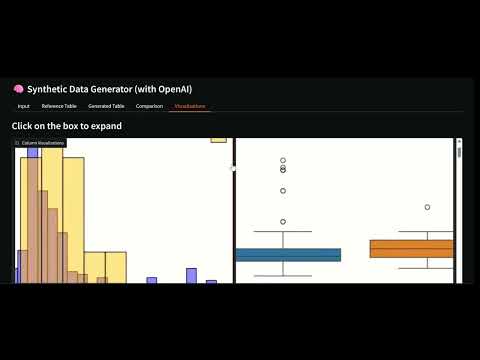
Click to watch a complete walkthrough of the application
📋 Features
- Intelligent Generation: Generates synthetic data using OpenAI models (GPT-4o-mini, GPT-4.1-mini)
- Web Interface: Provides an intuitive Gradio UI with real-time data preview
- Reference Data: Optionally load CSV files to preserve statistical distributions
- Export Options: Download generated datasets directly in CSV format
- Included Examples: Comes with ready-to-use sample datasets for people and sentiment analysis
- Dynamic Batching: Automatically adapts batch size based on prompt length and reference sample size
- Reference Sampling: Uses random subsets of reference data to ensure variability and reduce API cost.
The sample size (default64) can be modified insrc/constants.pyviaN_REFERENCE_ROWS.
🚀 Installation
Prerequisites
- Python 3.12+
- OpenAI account with API key
Option 1: Using pip
# Create virtual environment
python -m venv venv
source venv/bin/activate  # On Windows: venv\Scripts\activate

# Install dependencies
pip install -r requirements.txt
Option 2: Using uv
# Clone the repository
git clone https://github.com/Jsrodrigue/synthetic-data-creator.git
cd synthetic-data-creator

# Install dependencies
uv sync

# Activate virtual environment
uv shell
Configuration
- Copy the environment variables example file:
cp .env_example .env
- Edit
.envand add your OpenAI API key:
OPENAI_API_KEY=your_api_key_here
🎯 Usage
Start the application
You can run the app either with Python or with uv (recommended if you installed dependencies using uv sync):
# Option 1: using Python
python app.py

# Option 2: using uv (no need to activate venv manually)
uv run app.py
The script will print a local URL (e.g., http://localhost:7860) — open that link in your browser.
How to use the interface
-
Configure Prompts:
- System Prompt: Uses the default rules defined in
src/constants.pyor can be edited there for custom generation. - User Prompt: Specifies what type of data to generate (default: 15 rows, defined in
src/constants.py).
- System Prompt: Uses the default rules defined in
-
Select Model:
gpt-4o-mini: Faster and more economicalgpt-4.1-mini: Higher reasoning capacity
-
Load Reference Data (optional):
- Upload a CSV file with similar data
- Use included examples:
people_reference.csv,sentiment_reference.csvorwine_reference.csv
-
Generate Data:
- Click "🚀 Generate Data"
- Review results in the gradio UI
- Download the generated CSV
📊 Quality Evaluation
Simple Evaluation System
The project includes a simple evaluation system focused on basic metrics and visualizations:
Features
- Simple Metrics: Basic statistical comparisons and quality checks
- Integrated Visualizations: Automatic generation of comparison plots in the app
- Easy to Understand: Clear scores and simple reports
- Scale Invariant: Works with datasets of different sizes
- Temporary Files: Visualizations are generated in temp files and cleaned up automatically
🛠️ Improvements and Next Steps
Immediate Improvements
-
Advanced Validation:
- Implement specific validators by data type
- Create evaluation reports
-
Advanced Quality Metrics
- Include more advanced metrics to compare multivariate similarity (for future work), e.g.:
- C2ST (Classifier Two‑Sample Test): train a classifier to distinguish real vs synthetic — report AUROC (ideal ≈ 0.5).
- MMD (Maximum Mean Discrepancy): kernel-based multivariate distance.
- Multivariate Wasserstein / Optimal Transport: joint-distribution distance (use POT).
- Include more advanced metrics to compare multivariate similarity (for future work), e.g.:
-
More Models:
- Integrate Hugging Face models
- Support for local models (Ollama)
- Comparison between different models
Advanced Features
-
Conditional Generation:
- Data based on specific conditions
- Controlled outlier generation
- Maintaining complex relationships
-
Privacy Analysis:
- Differential privacy metrics
- Sensitive data detection
- Automatic anonymization
-
Database Integration:
- Direct database connection
- Massive data generation
- Automatic synchronization
Scalable Architecture
-
REST API:
- Endpoints for integration
- Authentication and rate limiting
- OpenAPI documentation
-
Asynchronous Processing:
- Work queues for long generations
- Progress notifications
- Robust error handling
-
Monitoring and Logging:
- Usage and performance metrics
- Detailed generation logs
- Quality alerts
📁 Project Structure
synthetic_data/
├── app.py                 # Main Gradio application for synthetic data generation
├── README.md              # Project documentation
├── pyproject.toml         # Project configuration
├── requirements.txt       # Python dependencies
├── data/                  # Reference CSV datasets used for generating synthetic data
│   ├── people_reference.csv
│   ├── sentiment_reference.csv
│   └── wine_reference.csv
├── notebooks/             # Jupyter notebooks for experiments and development
│   └── notebook.ipynb
├── src/                   # Python source code
│   ├── __init__.py
    ├── constants.py       # Default constants, reference sample size, and default prompts
│   ├── data_generation.py  # Core functions for batch generation and evaluation
│   ├── evaluator.py        # Evaluation logic and metrics
│   ├── IO_utils.py         # Utilities for file management and temp directories
│   ├── openai_utils.py     # Wrappers for OpenAI API calls
│   └── plot_utils.py
     # Functions to create visualizations from data
└──  temp_plots/            # Temporary folder for generated plot images (auto-cleaned)
📄 License
This project is under the MIT License. See the LICENSE file for more details.
🎓 Course Context & Learning Outcomes
This project was developed as part of the LLM Engineering: Master AI and Large Language Models course on Udemy. It demonstrates practical implementation of:
Key Learning Objectives:
- Prompt Engineering Mastery: Creating effective system and user prompts for consistent outputs
- API Integration: Working with OpenAI's API for production applications
- Data Processing: Handling JSON parsing, validation, and error management
- Web Application Development: Building user interfaces with Gradio
Course Insights Applied:
- Why OpenAI over Open Source: This project was developed as an alternative to open-source models due to consistency issues in prompt following with models like Llama 3.2. OpenAI provides more reliable and faster results for this specific task.
- Production Considerations: Focus on error handling, output validation, and user experience
- Scalability Planning: Architecture designed for future enhancements and integrations
Related Course Topics:
- Prompt engineering techniques
- LLM API integration and optimization
- Selection of best models for each usecase.
📚 Course Link: LLM Engineering: Master AI and Large Language Models